LIFEJOURNAL: Software for Journal Writing
& for Preserving, Recalling, and Writing Your Life Story
LifeJournal Software for journal writing and for preserving, recalling, and writing your life  story is powerful journal software designed specifically to organize your thoughts and stories, pump up your creativity, capture and organize your ideas, make it easy to write daily and be super-productive. LifeJournal will inspire you to keep a writing journal, to organize your writings and to track your life — past, present and future — so you devote more time to writing and less time to organizational chores. And it's all 100% private, secure, and password-protected! story is powerful journal software designed specifically to organize your thoughts and stories, pump up your creativity, capture and organize your ideas, make it easy to write daily and be super-productive. LifeJournal will inspire you to keep a writing journal, to organize your writings and to track your life — past, present and future — so you devote more time to writing and less time to organizational chores. And it's all 100% private, secure, and password-protected!
Write and Organize
Imagine writing and storing all your work – journal entries, drafts, anecdotes, research notes, poems, stories, and articles – in one comprehensive piece of software. You can work on drafts, do writing exercises to increase your skill, generate new work, record dreams and conversations. And by assigning topics to entries or passages you can always find what you are looking for in your writing journal.
Be Inspired to Write in Your Writing Journal
With LifeJournal Software, you will look forward to sitting down to work in an encouraging and inspiring writing journal. Even when you're unsure of what you want to write about, the software gives you numerous interactive tools, including hundreds of writing prompts, especially designed to stimulate your thinking, jumpstart your writing journal efforts, and keep you coming back again and  again. again.
Search, Review, and Reflect in Your Writing Journal
LifeJournal's Search and Review tools let you find exactly the writing you are looking for – by topics, keywords, date, and journal type – and quickly compile notes scattered in numbers of entries, compare similar drafts, or mine personal journal entries to use for other pieces. And LifeJournal for Writers helps you pull it all together to re-read, mine, and reshape.
Raise Your Writing and Writing Life to the Next Level
LifeJournal Software provides the motivation, learning and filing system writers need to succeed in putting their experiences on the page.
Return to top
FEATURES AND SCREENSHOTS
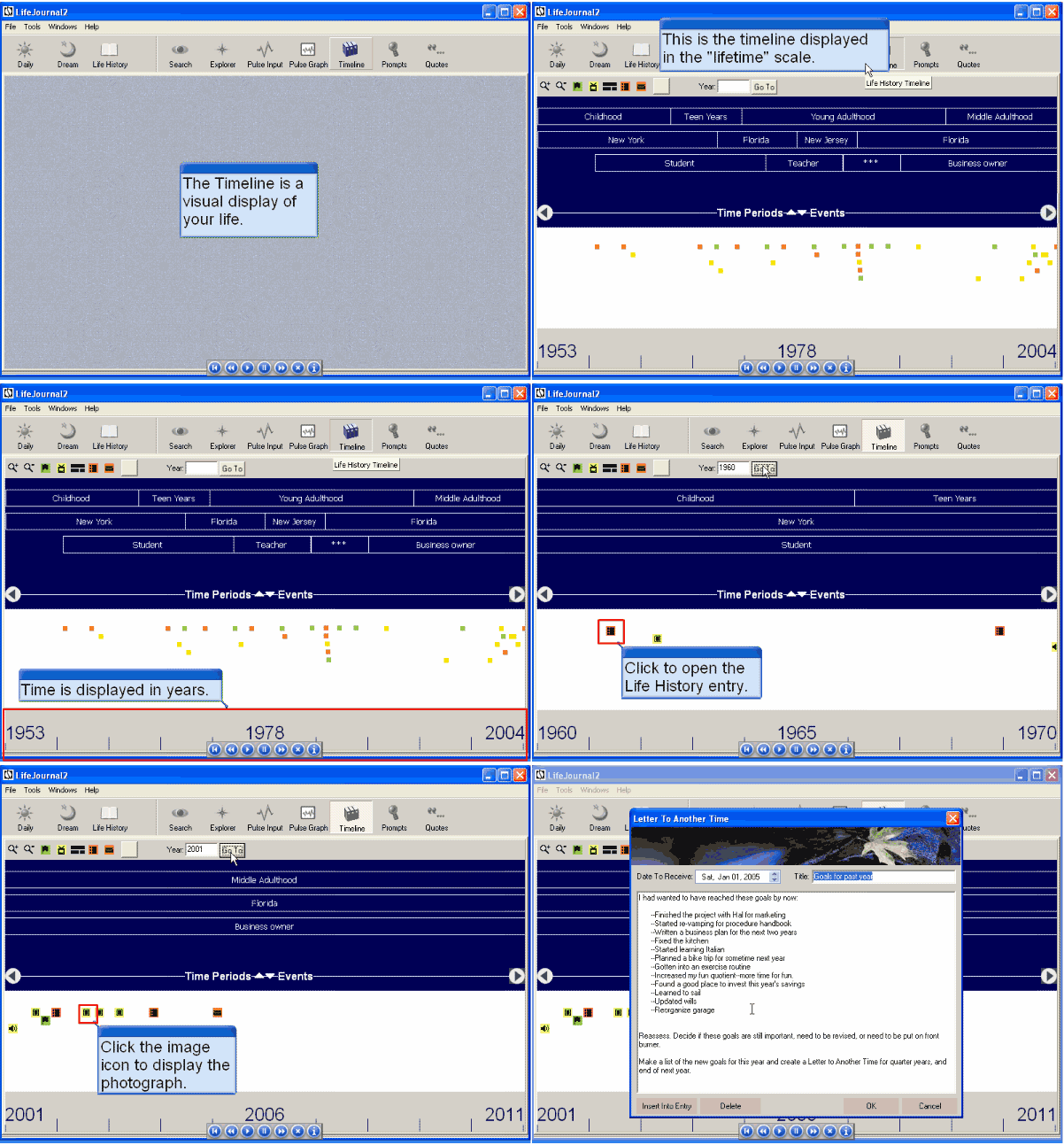
Use the Timeline to Create a Visual Display of your Life
– or the Lives of Your Characters
Create a visual display of your past. Create your life history, or life histories for fictional characters. When you write you'll have an easy reference for constructing 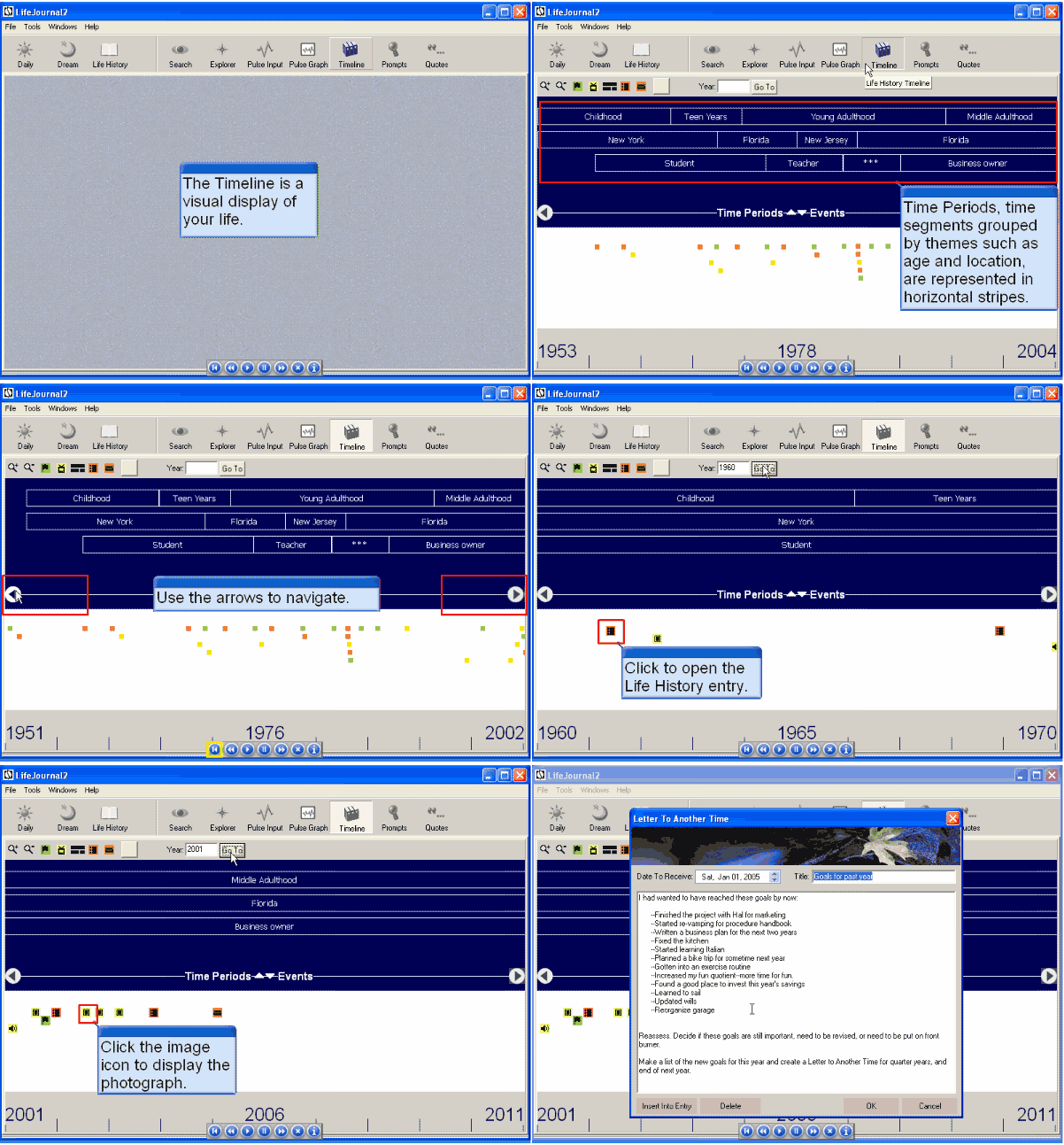 memoirs. Commemorate events in your life or your characters' lives with corresponding life history journal entries, photos, audio and video files and hyperlinks. memoirs. Commemorate events in your life or your characters' lives with corresponding life history journal entries, photos, audio and video files and hyperlinks.
This first screenshot is animated to show you the remarkable usefulness of this, the Timeline feature, one of the "hearts" of the LifeJournal (click here to see the large-size, slowed-down demonstration of this feature)
The LifeHistory Processor Gives You a True Life-History Word Processor
Create a visual display of your past. When you write you'll have an easy reference for constructing 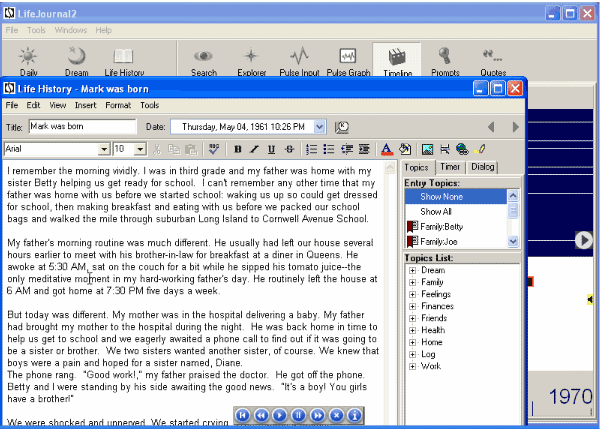 memoirs. Commemorate events in your life with corresponding life history journal entries, photos, audio and video files and hyperlinks. You can even create "life histories" of fictional characters; it's a great tool for writing short stories, even novels. memoirs. Commemorate events in your life with corresponding life history journal entries, photos, audio and video files and hyperlinks. You can even create "life histories" of fictional characters; it's a great tool for writing short stories, even novels.
(click to see larger size.)
Write and Index Journal Entries Easily
with All the Right Tools at your Fingertips
LifeJournal's familiar word processing functions, insert and 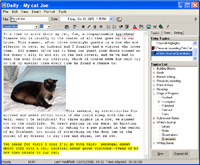 hyperlink capacity and easy organizational structure make it easy to write. Organize and store your entries in Daily, Draft, Submissions, and Life History journal entries. You can assign topics to the entire journal entry or to specific passages, so you can quickly search and review your writings. Customize the Topics List, accessible from the right side of every entry, to reflect your world. Insert pictures, or insert links to audio files, video files, websites, word docs, or any files easily. This software will help you stay focused, become organized, and use your writing time efficiently! hyperlink capacity and easy organizational structure make it easy to write. Organize and store your entries in Daily, Draft, Submissions, and Life History journal entries. You can assign topics to the entire journal entry or to specific passages, so you can quickly search and review your writings. Customize the Topics List, accessible from the right side of every entry, to reflect your world. Insert pictures, or insert links to audio files, video files, websites, word docs, or any files easily. This software will help you stay focused, become organized, and use your writing time efficiently!
Prompts and Quotes for Writers
and Writing Tips Help Kick Start Your Writing
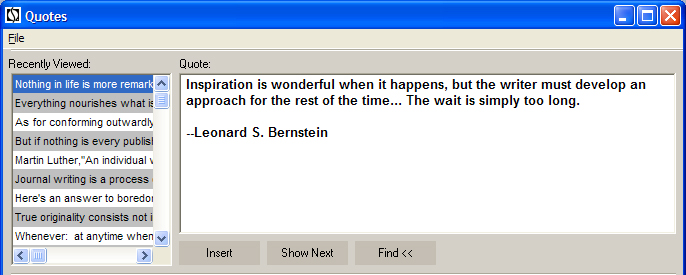
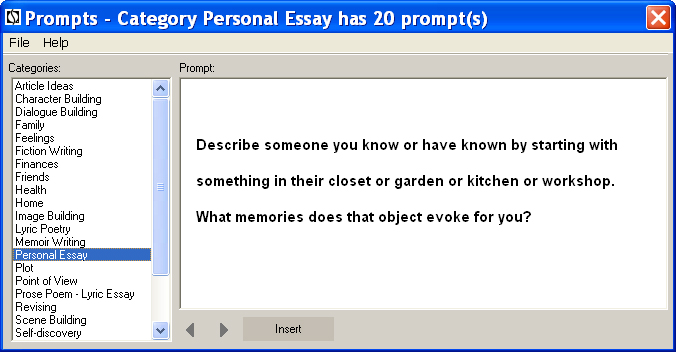
LifeJournal comes loaded with more than 300 Prompts in 19 categories, more than 2500 Quotes, and 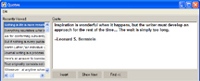 over 350 succinct writing tips to over 350 succinct writing tips to 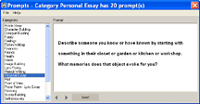 inspire your writing, when you don't want to start writing from a blank page. With quotes from great writers, writing tips and writer resource creative writing prompts from a master teacher, LifeJournal will kick start your writing. You can easily insert additional information, prompts and quotes, writing exercises to questions that will evoke deeper thinking to quotes from other sources of inspiration into your entry.Get your creative writing ideas down on the page today with this software for writers! inspire your writing, when you don't want to start writing from a blank page. With quotes from great writers, writing tips and writer resource creative writing prompts from a master teacher, LifeJournal will kick start your writing. You can easily insert additional information, prompts and quotes, writing exercises to questions that will evoke deeper thinking to quotes from other sources of inspiration into your entry.Get your creative writing ideas down on the page today with this software for writers!
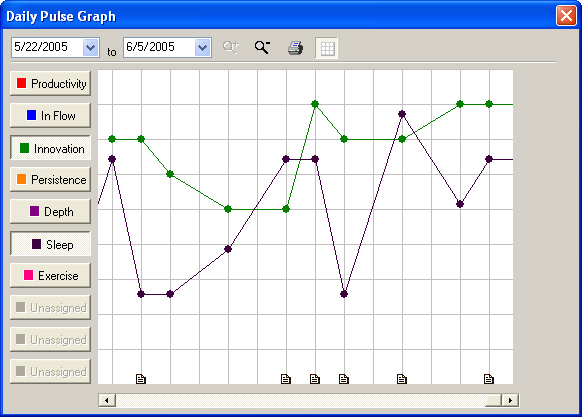
Your Daily Pulse Lets You Track
Your Professional and Personal Life
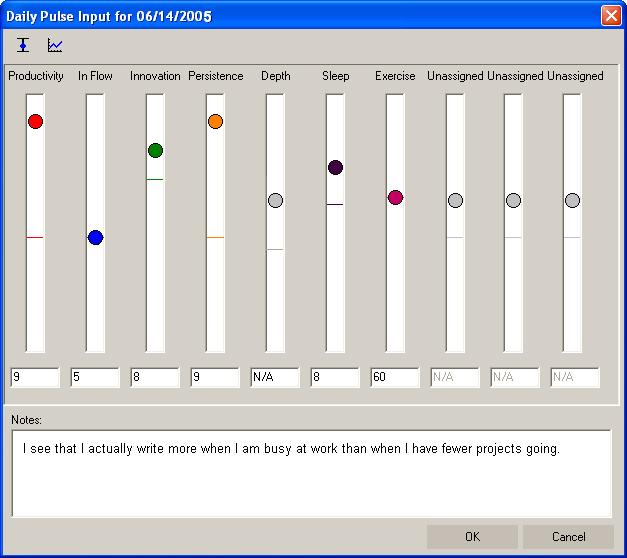
Quickly record the "pulse"of your day with interactive gauges. You can track up to ten Daily Pulse scales: subjectively rate 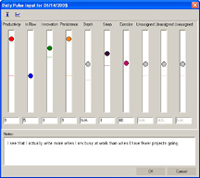 productivity, ability to stay in flow, and objectively count the hours you wrote or read for inspiration. Then view the line graphics of your Pulse charted over time. You can display multiple Daily Pulse scales simultaneously to contrast, compare, and find correlations between one scale and another. Learn more by double clicking points on the productivity, ability to stay in flow, and objectively count the hours you wrote or read for inspiration. Then view the line graphics of your Pulse charted over time. You can display multiple Daily Pulse scales simultaneously to contrast, compare, and find correlations between one scale and another. Learn more by double clicking points on the 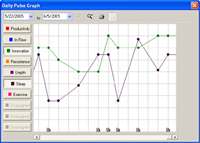 graph to read corresponding journal entries. Unique among software for writers, you'll learn what factors are most conducive to a good writing session. graph to read corresponding journal entries. Unique among software for writers, you'll learn what factors are most conducive to a good writing session.
The Journal Explorer Helps You Search, Find and Review
LifeJournal creates an indexed database of your entries and then gives you the tools to find and display a list of entries by date, types, or topics. The powerful Journal search engine lets you instantly find journal entries when you search by word, phrase, topic, date, Daily Pulse, or any combination. Keep all your writing in one easily and intelligently searchable place.
Return to top
USER COMMENTS
• Alice Smith:
"I have been using LifeJournal for almost ten years now, and often give the software as a gift. You have a wonderful product, one that I dreamed of.... It has far surpassed my expectations."
• Sue Caskey:
"Can I just say, I love your journaling software! I may leave it for a while, but I always come back. It puts such flexiblity into the structure of my journal writing, it is unlike any other journal system I've ever used. Thank you very much for developing Life Journal!"
• August Kennedy, August Kennedy and Associates:
"When I formed my seminar on creating health and vitality I wanted a to offer to my participants a journal that would inspire and open possibilities for them while they were journaling. When I purchased the Life Journal 2 software and began using it I was amazed. I have never been thrilled with journaling in my past and now I find myself looking forward to using the program. It opened up possibilities for me in journaling that I had not ever expected. I recommend this program for anyone wanting a powerful and inspiring environment to do their journaling."
• Faith:
"LifeJournal is a psychological anchor during crisis. Far beyond efficiency, organization, and inspiration, LifeJournal allows a safe and private location to express my deepest feelings. I have been journaling and writing for years, but LifeJournal now allows me to write without roadblocks. During challenging times, I am not always able to connect my heart and mind with a blank page and pen. As a writer, I know I should write to investigate my inner feelings, but the blank page represents a list of "woulda", "coulda", "shoulda's" pointing directly to my current block. In comparison, LifeJournal invites me into the process with inspirational prompts, quotes, and operational ease. LifeJournal offers promise not pressure. In addition, as an illustrator, LifeJournal also allows the seamless integration of art within the written text."
• Uilleam Walter Hawke:
"LifeJournal is hands down the best journaling software on the market, and I love it and recommend it. Thanks for the personalized help, another reason to recommend LifeJournal."
• Arial Williams:
"LifeJournal is -- and has been -- a tool that opens incredibly wonderful paths for learning to name and live deeply the joys, failures, weaknesses, and victories that form my creative and spiritual growth.
A session with LifeJournal before discussing--almost anything of importance--with my husband provides me inner clarity and deeper focus when we engage in these conversations.
The most magnificent opening going to Life Journal creates is in development of a true "working relationship" and endlessly (I believe) deepening conversation with my Creator.
Because of the lovely palette of background colors, font style/color possibilities, and tools like Daily Pulse, naming and choosing icons, and unique writing environments for various kinds of journals -- and the delight creating a life history within the core of all that, I move to a "new world" that is distinct, private and pleasing. I find within the LifeJournal "world" a sense of comfort, support and freedom to speak and dream that is absent in the environment of Word and other work-related software. You have created a lovely and enduring tool for your LifeJournal customers. I thank you for that--and for the personal attention you give those who are blessed to use your creation."
• Pam Durant:
"Thanks so much for such a cool product that gives me just a bit more incentive to write and kick procrastination's butt."
• Gary Bisogna, psychologist:
"LifeJournal is the 'Cadillac' of journaling software."
• Russ Lemker:
"I have over four years worth of entries with anywhere from a few lines to many pages, but something every day. LifeJournal is a great tool, and although I sometimes fight the urge to switch to Word because of the more sophisticated editing capabilities, I have never found anything that comes close to LifeJournal for the perfect blend of form and function. It's all about the writing, after all!"
• S. Alli:
"I am very much enjoying this remarkable piece of journal software. Am looking forward to making it my overall think space rather than continuing with just a daily style journal; it seem like a waste of useful features/layout to do otherwise."
• Jamia Kelly:
"LifeJournal is a great program, and I'm determined to use it daily, at least fifteen minutes. Writing daily, a "brain dump," really seems to spark my creativity for the rest of the day. LifeJournal is a wonderful product. I looked for journaling software for several years, and none of the others I saw even came close to LJ2. Thanks for creating a truly great journal system!"
• Scott Albers:
"Thank you for your in-person, immediate personal assistance. Combined with a top-its-class software application, this makes LifeJournal one of the finest software development firms I have ever known.
"
• Debbie Meadows:
"I had used another journaling software (Journal 4) for a while. Just today I found LifeJournal and tried it. Wow--what a difference! LifeJournal is SO much more user-friendly. Even the most basic things--like finding your past entries--are much clearer in LifeJournal. Before I dreaded going into the other journaling software and wasting my time. Now, I can't wait to open LifeJournal and write in it. Thanks for an awesome program!"
• B. Wright:
"Although I have kept journals sporadically through my 56 years, LifeJournal has enabled me to accomplish more in less time and with greater self-awareness."
• Kate Harding:
"I love LifeJournal and its newsletters--it is always a highlight to get the next edition. When I'm stressed from the day job I actually look forward to hearing the little startup tune when going into LJ2!!"
• Pat Keenan:
"The whole program has helped me to focus my inner self. It has been a stressful year on my job and LifeJournal has helped a great deal in just the short time I have been using it."
• Maggie Zadek:
"I absolutely love this journaling software. I have been journaling for over 35 years and your program is stupendous! As a psychotherapist, I frequently recommend it to my patients. It has the potential to stimulate so much growth and grounding upon the discovery of their true selves."
|
|
• Laura F.:
"Several years ago, I decided that switching to the computer, as a means of journaling, would be a good idea. I type 92 words a minute, and typing my journal entries would significantly cut down on the hours I spend actually writing longhand in a book. I, of course, had no kind of journaling software, so I just used Microsoft Word. That experiment was a dismal failure. There was no way to find anything; there was no way to keep entries in any kind of order, as Word dates things by "date modified", and every time you open a document it is considered to be modified. It drove me absolutely nuts, so I gave up and went back to pen and paper.
Then my boyfriend bought me LifeJournal for Valentine's Day. I thought it was really sweet, but I almost didn't try it. I had been after him for eons to write me some journaling software, and he just never found the time to do it, so I thought it was kind of a cop out. After I got over my pout, I went ahead and tried it out, and I love it. I've used it ever since. It saves in chronological order, and that makes my life so much easier. I like that I can assign topics to my entries, so I can tell, at a glance, what I was dealing with/feeling, and I lovelovelove the prompts feature. I've always tried to write something every day, and sometimes writers block or lethargy really hampers that goal. With the prompts option, I'm able to write something every single day. If I don't have a topic of my own, it's so easy to just hit the prompts button and answer a question. I've actually written some of my best, most introspective and in-depth journal entries using that feature."
• E. Greene:
"I've been using LifeJournal for several months now and I'm certain that this is far and away the best journaling software I've come across. It has more value than any other journaling software I've tried. I think I checked out about 6 or 7 of them. I love that you can take the information that you've written and slice it and dice it in ways that will give you insight into your life. It's innovative. Much different than the other journaling software which are just word processors on steroids. This is really different. And it's easy to learn. I was up and writing a journal entry in the first 2 minutes of opening the program. Within an hour I tried out and understood all of the main features. And I love that there is such depth to the program. Even now, several months later, I'm discovering new bits of the program that deepen my writing."
• Arnie Stein:
"I just want to say thank you for such a killer app. I've written hundreds of Word documents as journal entries, and you're journaling software was able to import them without a great hassle. I now have ALL my journal writing under one umbrella. This make life SO much easier. I really can't thank you enough for Life Journal.
Instead of spending the weekend doing all the practical things, like paying bills and cleaning the apartment, I spent the majority of the weekend writing. Procrastination in reverse! This is easily the best forty dollars I've ever spent in my life. Thanks so much."
• Francoise:
"I kept a journal when I was young to help the sorting process. Now due to ill health I am forced to keep a journal, and I am finding this program absolutely amazing. Apart from record keeping and the Daily Pulse Graph, the prompts and quotes have made me aware of so many thoughts and feelings I didn't know I had. Bringing them to the surface will undoubtedly go a great way to recovery. And for the first time in my life I am enjoying journaling. I can feel the benefits of it. Thank you for a great program.
• Bob Weatherholt:
"I can stop looking now!!
For years I have been trying to keep a journal. I have tried hand written journals but never really felt comfortable with putting down everything I should since anyone could just pick it up and read to there hearts' content.
I started looking for journaling software programs to satisfy the requirements. But everything I found was lacking something. I must have looked at 15 to 20 programs ranging from pathetic to incredibly complex. Sometimes I would try it for a few weeks others for just a few minutes. But always the same result - DELETE.
Then I found "Life Journal". It had everything I was looking for and then some. The "Daily Pulse" feature is excellent. The Daily Entries are simple to use and allow you to tag or bookmark them for easy recall by virtually any organizational method you would need. This alone was enough for me to be more than satisfied.
But when I started to look at the Life History feature, I was blown away. It is the reason why keeping a journal became so important to me. I wanted to have something to give my kids when they got older. Something that they could refer to when they hit difficult times. Something to help them know and understand me better. I would give almost anything if I had something like this from my parents."
• M. Maidlow:
"I have had such a good time with this journaling software. The prompts are really helpful. Through them, I have looked at some points of my life that I haven't thought about in years, even through two years of psychotherapy.
I usually do my own events of the day and then use the timer to use the prompts, otherwise I would be at the journal 24/7. I'm hoping to be able to get the software for my daughters.
I have 3 daughters and they each have a daughter. Could Mother and daughter journal on the same journaling software, split by passwords? What a legacy that would be for future generations!!! And what therapy for my daughters!
Thanks. I have to say the software is so user-friendly and easy."
• Ann Isik:
"Morning Pages brought me to journaling, which brought me to LifeJournal, which gave me the courage to develop and set up my own web site. The site was to supposed to be for my visual art (I am a painter), but journaling and writing for the web site made me realise I should be writing as well as painting.
As a result, my visual work is progressing well now and I am doing a creative writing course, have come back to writing short stories (which I gave up years ago), and believe it or not, during the process of re-organising my life so I could fit in writing AND painting, with money found JUST through getting more efficient, we have been able to take up an apartment in Paris as well as our house in the country! Now I write in town and paint in the country.
It's great journaling software. Software that heals, hmmm, who would have thought, even 20 years ago, that a 'machine' that heals, would ever be a possibility! LifeJournal is without a doubt THE best 'personal' software I have ever bought. I couldn't recommend it more highly."
• George Collins:
"My set up was seamless. It's difficult not to notice all the attention to detail that your website and communications include."
|
|
Return to top
REVIEWS
• Barbara Bretton, USA Today best selling novelist, exclaims:
"I can't say enough good things about Life Journal. I'm a professional writer who has been keeping a journal since I was 7 or 8 years old (about 40 years) and LifeJournal has done the impossible: made me love the process even more!"
• James W. Pennebaker, PhD, Professor of Psychology, University of Texas and author of Opening Up: The Healing Power of Expressing Emotion, states:
"The research findings are clear: writing about emotional events can help promote physical and mental health. A system like LifeJournal is a novel approach that has the potential to help millions explore their thoughts and feelings in a safe and creative way."
• Kathleen Adams, author, Journal to the Self, and Director, The Center for Journal Therapy, endorses the software:
"I love LifeJournal more each time I open it. It's genius personal journal software that you've created!" Read journal therapy expert Kay Adams' full endorsement."
• Director of The Center for Journal Therapy, Kathleen Adams' "Top 10 Reasons why LifeJournal is close to perfect":
"It's secure.
It's easy-to-use.
It's comprehensive.
It's interactive.
It's inspirational.
It's organized.
It's encouraging.
It uses good journal writing techniques.
It's easy to learn.
It's based on best practices."
• The Institute of Children's Literature has recently reviewed LifeJournal. Here's what the author, Kristi Holl, had to say:
"A New Discovery!
"I recently found a program called LifeJournal, which is journal software to be stored in your computer.... (Note: This is not online journaling, which has become popular recently, where your journal entries are posted to web pages through a "digital diary" for all to read. LifeJournal is private and password protected!) For those of you who want to find later what you've written, this is perfect. This journal for Windows has options to highlight, store, name and search/retrieve anything you've written. If you're tracking your progress in a specific issue, or you just want to find that fleeting inspired idea you jotted down, this journal might be for you.
LifeJournal also has quotes to inspire you, questions to promote self-reflection, a dream journal for recording dreams, several "tools" (like their Dialogue box) for effective journaling, and a daily pulse gauge to monitor your mood, health, energy and stress levels. Then, when you close the journal window, you don't need a hiding place! It's all in your computer, and unless you reveal your password, no one but you can access it. "
Return to top
How Writers Used Their Journals:
And Thoughts about How to Use Your Journal
by Ruth Folit, June 2003
- "Don't get it right the first time," James Thurber admonished. "Just get it written." The journal is the perfect place to get it written the first time--to have the space to work within the bounds of imperfection.
Writing within an environment where there is no audience to please helps most writers loosen up.
- Allen Ginsberg took the prose he had written in his journal and changed where he broke the lines and created poems. Re-read journal passages with this thought in mind. You may also consider going back to a list (see List Journal Technique in Help Menu) that you have created and see if it has potential as a poem.
- Notebooks that Dostoevsky kept while writing *Crime and Punishment* are notes to himself about how to write more convincingly. For example, he wrote "in giving it artistic form, don't forget that he is 23 years old." You may want to use your journal to coach yourself about guiding principles you want to remember when writing a piece.
- Virginia Woolf used her diaries to sort out her feelings about the writing process. She reported her doubts as well as her confidences about her books, as well as her worries about how the reviewers would respond. Expressing how you feel about your writing process may free you to write with greater ease.
- Graham Greene used his journal to store all kinds of information that he might later include in his writing: the big picture of a plot, anecdotes, and minute details. About how he utilizes this information, he remarked in a footnote in one of his journals: "The economy of a novelist is a little like that of a careful housewife, who is unwilling to throw away anything that might perhaps serve its turn. Or perhaps the comparison is closer to the Chinese cook who leaves hardly any part of a duck unserved."
- Writers as diverse as Robert Louis Stevenson, Amy Tan, and Spaulding Gray credit their dreams as inspiration for their stories. Keep a notebook by the side of your bed so you can write down a few notes about the dream before you get out of bed. Then, go directly to your computer (which you may want tokeep on overnight so you don't have to wait while it boots up), open a Dream Journal entry, and write as much of the dream details as you can remember.
- Eavesdrop shamelessly. Maeve Binchy, author of *Circle of Friends*, describes in an essay in *The Writer* magazine how she purposefully goes to particular places to overhear dialogues that overlap with what she is writing. If, for example, you are writing a conversation between eight year old boys, spend time in a nearby playground or video arcade. Listen astutely and you'll learn more than just what people are saying, but how they say it: speech patterns, slang phrases, and the rhythm of the conversation.(Keep these overheard conversations in your LifeJournal, under a Topic such as "Conversations." You may want to also create a Topic called "Characters" to include the cast of characters on which you are working.)
- F. Scott Fitzgerald used a special notebook exclusively to write possible titles for his works. Create a Topic or a journal entry called "Possible Titles" and add to it whenever an idea surfaces. You'll have a plethora of possibilities handy next time you look for a title.
©2013 Ruth Folit
Return to top
REQUIREMENTS
Compatible with: Windows 2000/XP/Vista/7/2010, or higher.
|


 memoirs. Commemorate events in your life or your characters' lives with corresponding life history journal entries, photos, audio and video files and hyperlinks.
 hyperlink capacity and easy organizational structure make it easy to write. Organize and store your entries in Daily, Draft, Submissions, and Life History journal entries. You can assign topics to the entire
  over 350 succinct writing tips to
  inspire your writing, when you don't want to start writing from a blank page. With quotes from great writers, writing tips and writer resource creative writing prompts from a master teacher, LifeJournal will kick start your writing. You can easily insert additional information, prompts and quotes, writing exercises to questions that will evoke deeper thinking to quotes from other sources of inspiration into your entry.Get your creative writing ideas down on the page today with this software for writers!
 productivity, ability to stay in flow, and objectively count the hours you wrote or read for inspiration. Then view the line graphics of your Pulse charted over time. You can display multiple Daily Pulse scales simultaneously to contrast, compare, and find correlations between one scale and another. Learn more by double clicking points on the
  graph to read corresponding journal entries. Unique among software for writers, you'll learn what factors are most conducive to a good writing session.